HIGHS
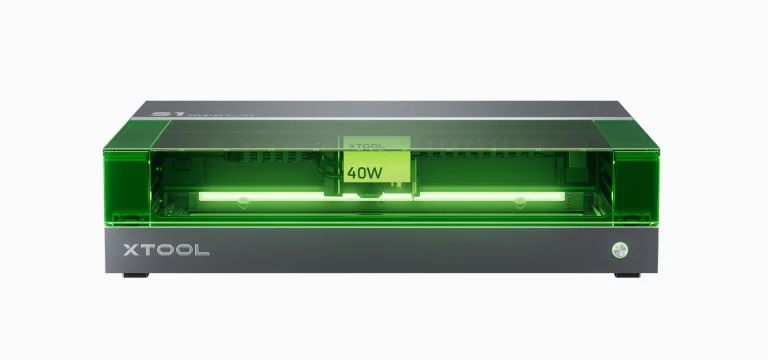
10, 20, 40W Options (interchangable)
Great built quality
Tight integration with xTool Creative Space
Adjustable air assist
xTool accessory integration (riser, rotary, conveyer belt)
LOWS
No camera
Additional riser needed for rotary
External air assist pump
Price History
Active Promo Codes
$80 Off purchases of $1000 or more
Technical Specifications
Power
Dimensions
Performance
Software
Features
Specifications
User Reviews
Reviews for This ModelVerified Owner
Ease of use and dependability.
Nothing
It cuts much faster than the laser on my M1.
It's not fast enough. It does an adequate job on 1/8" plywood but I wouldn't use it for 1/4" plywood.
Safety, The enclosed hard case blocks laser beam and extracts fumes
Using their software. Just added a camera and now went back to lightburn and am much happier.
Ease of use, the software, quite easy learning curve
Would prefer other laser source for more freedom on material choices. Slowish, camera as add on woulld be nice
All save (closed, filter, so no smoke) and almost zero smell. Very easy to use.
no plastic cutting (diod), but over all nothing really frustrates me ;-)
Woodworking on bamboo is perfekt for engraving
Nothing by far
not used it much yet
not used it much yet
So far it's been trouble-free, it's fast and reliable and easy to work with
That it was advertised as a laser that can stand in a living room because it's closed and ventilation is so good and that's not true, I get a lot of smoke in my basement room and need to use a mask as well as an air purifier so I avoid breathing it all the time
Expanded capability and work area over the D1. So easy to use with XCS
I bought it on FB Marketplace. It's a 10W and I'm not seeing a 20W to buy. Wondering if I will be able to find a 20 or if I will have to go to a 40
The 40w power. Makes cutting on a single pass easy.
The so we
Ease of use, price
Speed, diode laser
Being able to use the machine for any material I need.
Have no complaints the machine has been great.
Compact and easy to use
Slow speed
great detailed engravings. Has been a workhorse for us as we have ramped up use of the Mira9 - but XCS is easy to use and often becomes the fall-back laser for small projects
limitations that come with a 20W diode - slower speed, lack of ability to cut clear acrylic, etc - not the machines issue just the technology
quality of the machine, enclosed work area, ease of use
limited cutting dimensions
Self contained unit
Need a bigger cutting area
Its greatest asset is its versatility.
No camera, and I would have liked a larger engraving size.
Marking option
Editing functionality. I mostly use Lightburn to edit my patterns and export it as Svg so I can use it on xtool
Have not used it enough to know
Not being able to work with clear acrylic even though I've never tried it
Easy to use and you can send jobs to it via the network.
Working area is small compared to the bed size, loud beeping. My computer is in another room from the laser and i have to do multiple trips if I forget to close the lid when calibrating the workpiece position. It has trouble cutting even 3mm opaque acrillyc glass.
Enclosed system, good build quality.
Everything XCS. It is US biased software (I think I said it before but please no more eagles with stars & stripes in XCS!), I loathe the implementation of "Atomm" or design space, or whatever they call it now and all of the suggested projects. I like that I can access this, but the terrible UI/UX - splash screens and having to click so many times to get to what I need to do. If only it would just load up with a project screen, with a simple button that takes you to the projects, etc. So distracting and makes the user experience frustrating - IMHO. When it does load up and you've got to the main screen, it is okay. The tool head swap is frustrating, and I wish I could remotely click go (again another frustration is how many time you have to switch between the software an hardware - in my case my laptop is a few feet from the laser).
Faster than the previous machine (S1 20W), familiar since we already had an S1
maintenance, proprietary software, lack of speed, mediocre features
Much easier to use than homemade laser, well made, ease of use is excellent
Maintenance required, cost of equipment, proprietary software
Great machine: auto measure, auto size and easy controls
New software from X TOOL changed to NEW name and made me relearn most of the controls
The touch focus system
No camera
It’s incredibly easy to use - it actually just works!
Underpowered (I got the 10w thinking it would be sufficient since I only do engraving) and upgrades are extortionately expensive - they clearly want you to just buy another machine.
Everything......and the present software just compliments it that much more
Nothing, I like everything about it
Power and workspace
Lack of camera
Very easy to use. Fantastic software. Auto focus.
The air filters have to be replace quite often and they are a bit expensive.
How quickly I can go from powering on the S1 to beginning a cut is great. Using XCS is very straightforward and helps with the workflow.
Too frequent software updates that are often not needed for my use.
It’s easy for me. I’ve rarely have issues getting it to do what I want and when I do have issues there is a lot of info online. I really like having the option of updating the diode module too to use more power.
I could not get it working with lightburn. Looking online it seems to be a common problem
I can cut and score leather (the original intent for which I bought it)
The fact that it cannot cut transparent or light colored acrylic
Ease of use
Inability to cut Acrylic
Easy to use, know where it is (once homes), tough probe, changeable power supply (455nm or 5watt IR), nice size
Nothing
Ease of use
XTool software is iffy, had to buy and use Lightburn
Ease of use
No camera, closed software environment
Speed and power
Software is rubbish
Being able to cut things exactly the size I need
The smell of course!
Juat creating and seeing the finished products.
I think I would have bought a Aeon laser instead of all the other lasers I bought.
Precise control over the placement of the head. In the past, none of my other systems were exact and it was frustrating. Having one that is exact is incredible.
The Bed Base. The honeycomb tray that it comes with should fit snug to the bed base in a jig or clamp so that it does not move and have a bit more breathing room under it. That was, when the honeycomb tray is removed, you are left with the removable tray bed that is a “JIG HOLDER”… Imagine that.
Totally enclosed
Larger bed
Enclosed, higher power. Background snapshot.
Better fume containment. I have an inline fan and vent to the outside, but still get more smell than I would like in the room.
The easy of use
Needs a camera
Ease of use and versatility
how the honeycomb mounts (or actually doesn't).
Easy setup, Easy software. I got first good results within few hours of receiving the package.
Needs a camera!
The camera on ps and the I've got pretty fast setup with s1 wasn't sure if I would like it but I do
Pricing I believe xtool makes a great product but just like the new f1 ultra 4700, do you know what kind of a fiber laser you can purchase for $4700
the freedom of creativity it affords me. Probably not what you were asking, but I'm not sure I'd buy another xTool.
I'd like better integration with LightBurn... so when I move up, I don't have to suffer through learning something new.
Ease of use and safety
Larger bed size
More Reviews from xtool Owners
These reviews are from other xtool machines and may not reflect this specific model's features
Ease of use
Size of work area
Ease of use
Difficulty of cleaning the first mirror and the lens
Variety of modules
Don't want to get it dirty using the 20 watt laser.